
AppRingtones2.3 - Google Play
You'll be able to see results in few seconds.
Publisher Description
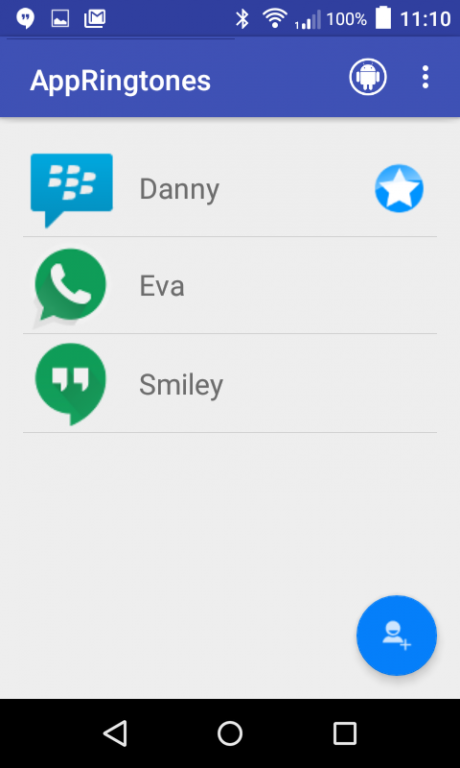
Customize ringtone and LED notification any application. Set individual ringtone and LED for your favorite instant messenger or communication app.
Ringtone and LED notifications can be configured to repeat from one to 1000 times. For important contacts or groups you can set a Contact or a Group to a VIP status. With the VIP status the ringtone will always be played even if the system sound volume is set to Vibrate or Silent.
You can select the ringtones that comes with the application or choose your own custom MP3 and M4A ringtones. There are over 70 different ringtones included with the application.
Support for LED notification. Not all devices have LED support. If your device does not have LED support then setting a LED color will not do anything. To avoid problems please do not set a LED if your device does not support LED.
You can set one of the following default LED colors: Blue, Cyan, Magenta, Green, Red, White or Yellow. If you want multi LED colors then select Custom and set any of the color combinations.
Note: On some devices LED will only blink if the screen is off.
You can stop the ringtone and LED notification when it is playing by simply shaking the device or wave your hand on top of the device. You can configure this in the Settings screen.
Features
★ Individual ringtone and LED for your favorite communication app like BBM, WhatsApp and Hangout.
★ Ringtone and LED for any application
★ Custom LED notification. Device requires LED support
★ Use your own custom sounds as such MP3 and M4A
★ Includes over 70 tones
★ Disable ringtone when you are on the phone
★ Shake device to stop ringtone and LED
★ Wave on top of the device to stop ringtone and LED
★ Set custom font size
★ Set custom volume for each ringtone or use the system default Media sound
★ Respect system Silent and Vibrate sound profiles
★ Set Repeat ringtone and LED
★★★ Important ★★★
Notification for the each application must be enabled in the Settings application.
About AppRingtones
The company that develops AppRingtones is Toysoft Inc.. The latest version released by its developer is 2.3.
To install AppRingtones on your Android device, just click the green Continue To App button above to start the installation process. The app is listed on our website since 2016-03-25 and was downloaded 0 times. We have already checked if the download link is safe, however for your own protection we recommend that you scan the downloaded app with your antivirus. Your antivirus may detect the AppRingtones as malware as malware if the download link to com.toysoft.appringtones is broken.
How to install AppRingtones on your Android device:
- Click on the Continue To App button on our website. This will redirect you to Google Play.
- Once the AppRingtones is shown in the Google Play listing of your Android device, you can start its download and installation. Tap on the Install button located below the search bar and to the right of the app icon.
- A pop-up window with the permissions required by AppRingtones will be shown. Click on Accept to continue the process.
- AppRingtones will be downloaded onto your device, displaying a progress. Once the download completes, the installation will start and you'll get a notification after the installation is finished.
Program Details
System requirements
Download information
Pricing
Version History
version 2.3
posted on 2016-03-25
* Added set ringtone and led for individual application with keywords. Now you can have any ringtone for any specific keyword like individual sms and email ringtone and led,* Added new dialog alert,* Bug fixes
Disclaimer
Official Google Play Link
We do not host AppRingtones on our servers. We did not scan it for viruses, adware, spyware or other type of malware. This app is hosted by Google and passed their terms and conditions to be listed there. We recommend caution when installing it.
The Google Play link for AppRingtones is provided to you by apps112.com without any warranties, representations or guarantees of any kind, so access it at your own risk.
If you have questions regarding this particular app contact the publisher directly. For questions about the functionalities of apps112.com contact us.
